
Quick answer
360tours.studio supports prepared per-scene and whole-tour narration (with AI script drafting and multilingual audio), self-recorded audio or video presenters via computer or QR phone handoff, and talking AI avatar guides (AI-generated or uploaded portraits animated in sync with English narration).
Key Takeaways
- Prepared per-scene and tour-wide narration with AI script drafting and translation
- Upload a photo or generate an AI presenter portrait in four styles (free)
- Talking AI avatar videos lip-synced to your narration (English rollout, up to 2 minutes)
- Record your own audio or video from a computer or phone via QR code + teleprompter
- Captions, transcripts, music ducking and optional post-narration contact CTAs
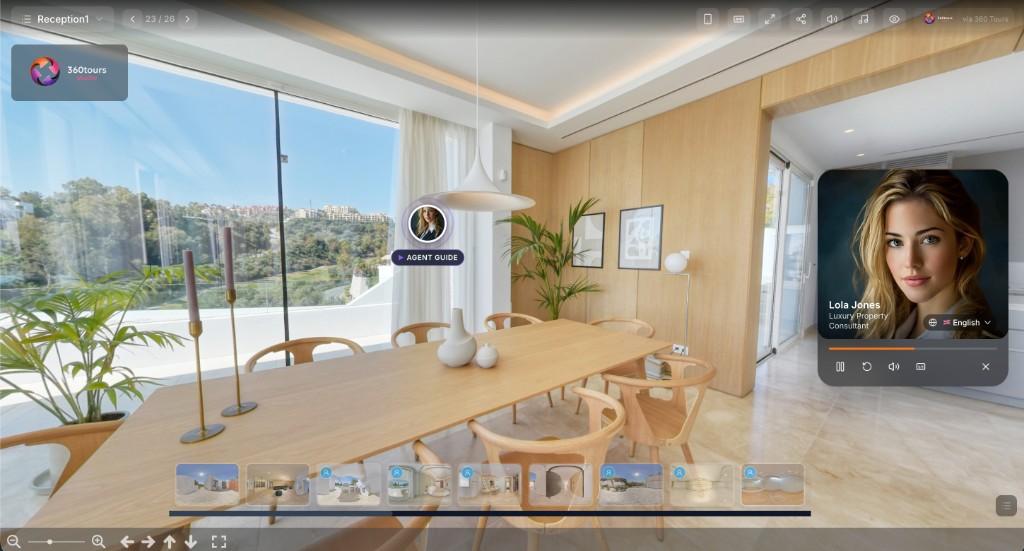
Hear and see an AI avatar narration example
Watch a generated lip-synced talking AI avatar delivering a room narration in English — built from a single presenter portrait and a tour script.
Practical benefit
Give remote viewers context that text labels miss — explain recent renovations, room proportions, natural light or local amenities as they move through the space, whether through an AI voice, your own presenter on camera, or a talking AI avatar.
Three distinct ways to present
Prepared AI narration lets you write scripts or draft and translate them with AI, choose a voice and presenter layout (such as an animated orb or portrait), and publish captions, transcripts and multilingual audio tracks. Recorded presenters let you capture your own audio or video from a computer or scan a QR code to record on your phone while reading an auto-scrolling teleprompter. Talking AI avatar guides combine a presenter portrait with generated narration to produce a lip-synced speaking video alongside the panorama.
How the AI avatar feature works
Start in the Presenter Library by uploading your own headshot, restyling an uploaded photo, or generating a bespoke AI presenter portrait (free across four presets: Professional / corporate, Friendly / approachable, Luxury / editorial, or Modern casual, plus an optional text description). Once a scene has generated voiceover audio, open Animated Guide in the scene editor to render a lip-synced talking avatar video (up to 2 minutes per scene). Rendering runs in the background so you can keep working, and visitors see the talking avatar with synced captions, playback controls and background-music ducking.
Important rollout and fallback notes
Talking AI avatar videos are currently rolling out with English as the default animated language. Supporting multiple audio languages does not automatically generate animated avatar videos in every language: if a visitor selects another language track that has not been separately animated, the viewer automatically plays that language’s audio over the static presenter portrait so English lip movements never play over translated speech. Guides deliver prepared narration and optional post-narration contact CTAs rather than live conversational Q&A chat.
Availability and credits
SalesGuide AI, AI script drafting, voice presenters, agent recording, QR phone recording and multi-language narration unlock on Sales Pro and above. Drafting scripts, translating scripts, previewing voices and generating AI presenter portraits are free; generating a new or updated voiceover audio track uses 1 credit, and rendering a talking AI avatar video uses 5 credits per 30-second block (automatically refunded if generation fails).